



Crawlability Meaning, crawl accessibility
Crawl accessibility is one of the foundational concepts of technical SEO. Before Google can understand, index, or potentially rank a webpage, its crawlers must be able to discover and access that page successfully.
A website can have excellent content and strong backlinks, but technical barriers such as incorrect robots.txt directives, server errors, broken internal links, JavaScript implementation issues, or inaccessible resources can prevent search engines from properly crawling important URLs.
Google’s technical requirements are straightforward: Googlebot must not be blocked, the page should return a successful HTTP status code,200, and the page must contain indexable content. Meeting these requirements does not guarantee indexing, but failing them can prevent a page from being eligible for Google Search.
Act Now: Crawlability Problems Are Blocking Your Best Pages
What Is Crawl Accessibility in SEO?
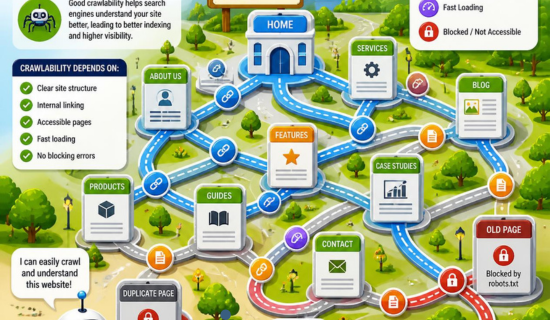
Crawl accessibility is the ability of search-engine crawlers to access and retrieve a webpage and its important resources without technical barriers.
In simple terms:
Crawl accessibility answers the question: Can Googlebot reach and fetch this page successfully?
It is closely related to crawlability, but the concepts can be separated:
- Crawlability: Can search engines discover and crawl URLs?
- Crawl accessibility: Can search engines actually access and retrieve those URLs and their required resources?
- Indexability: Is the crawled content allowed and suitable for indexing?
- Ranking: How competitive and relevant is the indexed page for a search query?
These stages should not be confused. A page can be crawlable but not indexable, or technically accessible but still not selected for indexing.
Digital Marketing + SEO: Powerful Ways to Increase Organic Traffic
Why Crawl Accessibility Matters for Technical SEO
Search engines discover URLs through links, sitemaps, redirects, and other signals. Google specifically recommends crawlable HTML links using an <a> element with an href attribute because these provide reliable paths for discovering URLs.
If an important page cannot be accessed, Google may not be able to:
- Retrieve its HTML
- Discover additional internal links
- Render important JavaScript
- Understand its content
- Process canonical signals
- Discover linked pages
- Add the page to the indexing pipeline
This makes crawl accessibility an important part of a technical SEO audit.
The Complete Truth About Dell Business Laptops (2026 Buyer Guide)
Crawl Accessibility vs. Crawlability
Although the terms are often used interchangeably, there is a useful technical distinction.
Crawlability is primarily concerned with whether search engines can discover and crawl URLs.
Crawl accessibility focuses more specifically on whether the crawler can successfully access the URL and the resources required to process the page.
For example, imagine a product page linked from your navigation:
Choosing the Best Lenovo Business Laptop in 2026 – Complete Guide
The URL may be discoverable, but if the server returns a 500 error, Google cannot successfully retrieve the page.
Likewise, a page may return 200 OK, but critical JavaScript or CSS resources may be blocked, potentially affecting how Google renders and understands the page.
Google recommends using Search Console’s URL Inspection tool to check whether Google can access a specific URL and whether important resources are blocked.
The SEO Entrepreneur: How to Start an SEO Business and Turn Your Entrepreneurial Dreams Into Reality
Technical Factors That Affect Crawl Accessibility
1. Robots.txt Configuration
The robots.txt file controls which URLs crawlers are allowed to request.
For example:
User-agent: *
Disallow: /private/
This tells compliant crawlers not to crawl URLs within that path.
The problem occurs when important SEO pages are accidentally blocked.
Common mistakes include:
Disallow: /or blocking directories containing:
- Blog posts
- Product pages
- CSS files
- JavaScript files
- Images
- Important resources
Googlebot checks robots.txt before making requests to URLs. If a URL is disallowed, Google skips the request.
International SEO Agency: The Ultimate Guide to Global SEO Growth
Important distinction
Do not use robots.txt as your primary noindex mechanism.
If you want Google to crawl a page but prevent it from appearing in Search, use a noindex directive instead. Google needs to access the page to see the noindex instruction.
2. HTTP Status Codes
Your server response directly affects crawl accessibility.
Important status codes include:
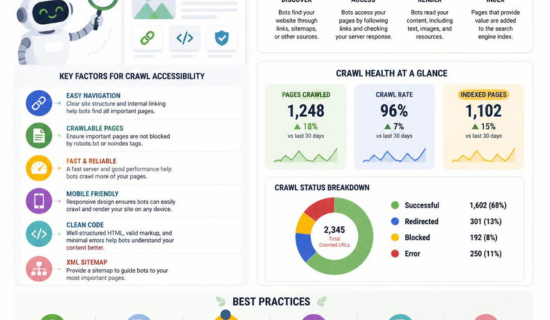
- 200 OK: Page successfully retrieved
- 301: Permanent redirect
- 302: Temporary redirect
- 404: Page not found
- 410: Content permanently removed
- 5xx: Server-side error
Google’s technical requirements state that a page needs to work and return a successful HTTP status code to meet the basic requirements for indexing.
A recurring pattern of server errors can therefore become a serious technical SEO problem.
Publisher Portfolio Quality Assessment: Everything You Need to Know Before Buying Guest Posts
What to check
During a technical SEO audit, identify:
- 5xx errors
- Broken URLs
- Redirect chains
- Redirect loops
- Incorrect redirects
- Soft 404 pages
- Intermittent server failures
- URLs returning unexpected status codes
3. Internal Links and Crawl Paths
Internal linking is one of the most important ways search engines discover pages.
A strong technical SEO architecture gives Google clear paths from one important URL to another.
For example:
Homepage → Category → Subcategory → Article
or:
Homepage → Services → SEO Services → Technical SEO
Google recommends crawlable links implemented with standard HTML anchor elements and valid href URLs.
Avoid relying entirely on:
- JavaScript click events
- Buttons that do not contain crawlable URLs
- Links without
href - Broken navigation
- Orphan pages
A page can technically exist on your server but still have poor discoverability if there are no useful internal paths leading to it.
The Ultimate Guide to Robots.txt: Prevent Google Indexing Issues
4. JavaScript and Crawl Accessibility
Modern websites frequently rely on JavaScript frameworks and client-side rendering.
Google can process JavaScript, but the implementation still matters.
Googlebot first fetches the URL, processes links and other information, and may subsequently render the page. Google specifically notes that JavaScript-generated links can be crawlable when they ultimately use appropriate <a href="..."> markup.
Problems can occur when:
- Important content exists only after failed JavaScript execution
- Navigation depends entirely on non-standard click handlers
- Critical resources are blocked
- Content requires user interaction before appearing
- JavaScript generates incorrect URLs
- Rendering produces different content from the original HTML
For important SEO pages, make sure the essential content and navigation remain accessible to search engines.
Advanced On Page SEO Optimisation: The Powerful Framework Google Rewards
5. XML Sitemaps
An XML sitemap is another important discovery mechanism.
A sitemap tells Google about URLs that you consider important.
For example:
<url>
  <loc>https://example.com/technical-seo/</loc>
</url>
Sitemaps are especially useful for large websites, newly published pages, websites with complex architectures, and pages that may not be easily discovered through internal links.
However, a sitemap does not override crawl blocks.
Think of it this way:
Internal links + sitemap = discovery signals
robots.txt + server accessibility = access conditions
Google recommends using sitemaps to encourage crawling while using robots.txt rules to control crawling where appropriate.
Advanced On Page SEO Optimisation: The Powerful Framework Google Rewards
6. Canonical URLs and Crawl Accessibility
Canonicalization helps search engines understand which version of duplicate or substantially similar URLs should be treated as the preferred version.
For example:
https://example.com/page
https://www.example.com/page
https://example.com/page/
may potentially represent different URL versions depending on the site’s configuration.
Google considers redirects and rel="canonical" strong canonicalization signals, while sitemap inclusion is a weaker signal.
Important technical SEO rule
Do not use robots.txt to canonicalize URLs.
Blocking a URL prevents Google from crawling its content, which means Google cannot properly evaluate the canonical relationship.
How Orphan Pages Affect SEO & How to Eliminate Them
7. Noindex vs. Robots.txt
This is one of the most common technical SEO misunderstandings.
Robots.txt
Controls crawling.
Disallow: /private-page/Noindex
Controls indexing.
<meta name="robots" content="noindex">If Google cannot crawl a page because robots.txt blocks it, Google may never see the noindex directive. Therefore, if your objective is to prevent indexing, the page generally needs to remain crawlable so Google can process the directive.
How to Build Authority, Visibility, and Online Income?
8. HTTPS and Server Accessibility
HTTPS is another fundamental technical consideration.
Your website should use a secure, consistently configured HTTPS version and avoid unnecessary HTTP-to-HTTPS redirect chains.
Check:
- HTTPS availability
- Certificate validity
- HTTP-to-HTTPS redirects
- Mixed-content issues
- Consistent canonical URLs
- Internal links using HTTPS
Google recommends HTTPS for website security and technical best practices.
How to Check Crawl Accessibility
A practical crawl accessibility audit can follow this process.
Step 1: Test important URLs
Use Google Search Console’s URL Inspection tool.
Check:
- Whether Google can access the URL
- Whether crawling is allowed
- Whether the page fetch succeeds
- Whether indexing is allowed
- Google’s selected canonical
- Rendered page information
Step 2: Review robots.txt
Look for accidental blocks affecting:
- Important pages
- Categories
- Services
- Products
- JavaScript
- CSS
- Images
- Other critical resources
Step 3: Check HTTP status codes
Use a technical SEO crawler or server logs to identify URLs returning:
- 4xx errors
- 5xx errors
- Redirect chains
- Redirect loops
Step 4: Audit internal links
Find pages with:
- No internal links
- Very deep crawl depth
- Broken internal links
- Poor anchor text
- JavaScript-only navigation
Step 5: Validate XML sitemaps
Make sure your sitemap contains the URLs you actually want search engines to discover and index.
Ideally, sitemap URLs should be:
- Canonical
- Indexable
- Live
- Returning
200 OK
Crawl Accessibility Technical SEO Checklist
Use this checklist during a technical SEO audit:
- Googlebot is not accidentally blocked
- Robots.txt is correctly configured
- Important URLs return
200 OK - No critical pages return 4xx/5xx errors
- Important pages have crawlable internal links
- Important URLs are included in XML sitemaps
- Sitemap URLs are canonical
- No accidental
noindexdirectives exist - Canonical tags are correctly implemented
- Redirect chains are minimized
- Redirect loops are eliminated
- Important JavaScript resources are accessible
- Critical content can be rendered
- Navigation uses crawlable links
- Orphan pages are identified
- HTTPS works correctly
- Search Console URL Inspection shows successful access
- Crawl Stats are monitored on larger websites
Crawl Accessibility and Crawl Budget
Crawl accessibility becomes particularly important on large websites.
If a site contains millions of URLs, search engines cannot necessarily crawl every URL equally frequently. Google recommends focusing crawl resources on important URLs and using sitemaps and appropriate crawling controls to help search engines discover the pages that matter most.
Common crawl-budget problems include:
- Endless URL parameters
- Duplicate URLs
- Faceted navigation
- Infinite spaces
- Session-based URLs
- Calendar-generated URLs
- Large numbers of low-value pages
- Redirect chains
- Server errors

objective is not simply to make every URL crawlable.
The better technical SEO objective is:
Make valuable URLs easy to discover, access, understand, and prioritize while controlling unnecessary crawling.
Advanced On-Page SEO Optimisation: The Powerful Framework Google Rewards
Frequently Asked Questions About Crawl Accessibility
What is crawl accessibility?
Crawl accessibility is the ability of search-engine crawlers such as Googlebot to successfully access and retrieve a webpage and its important resources.
What is the difference between crawlability and crawl accessibility?
Crawlability generally describes whether search engines can discover and crawl URLs, while crawl accessibility focuses on whether the crawler can successfully access and retrieve those URLs and resources.
Does robots.txt affect crawl accessibility?
Yes. A robots.txt rule can prevent Googlebot from requesting a URL. Incorrectly blocking important pages can therefore create crawl accessibility problems.
Does noindex block crawling?
No. noindex is primarily an indexing directive. Google needs to crawl the page to see the directive.
Can a page be crawlable but not indexed?
Yes. Successful crawling does not guarantee indexing. Google evaluates additional factors after accessing a page, and meeting the minimum technical requirements alone does not guarantee inclusion in Search.
How do I test crawl accessibility?
Use Google Search Console’s URL Inspection tool, review robots.txt, check HTTP status codes, analyze internal links, inspect XML sitemaps, and test whether important resources can be accessed and rendered.
Final Takeaway
Crawl accessibility is the technical foundation that allows search engines to reach your website’s valuable content.
The most important principle is simple: don’t make Google fight its way through your website.
Build clear internal linking paths, keep important pages accessible, configure robots.txt carefully, eliminate server errors, maintain clean XML sitemaps, implement canonical URLs correctly, avoid accidental noindex directives, and ensure JavaScript does not hide essential content or links.
Remember the technical SEO sequence:
Discover → Crawl → Access → Render → Index → Rank
Improving crawl accessibility does not guarantee rankings, but it removes technical barriers that can prevent search engines from properly processing the pages you want to compete in search results.
For a modern SEO strategy, crawl accessibility should therefore be treated as a core technical SEO requirement—not an optional optimization.