



The Truth About Using a Graphics Card for Laptop External Performance
Laptops are powerful, portable, and convenient—but when it comes to high-end graphics performance, they still fall behind desktop PCs. That’s where a graphics card for laptop external setup (also known as an external GPU or eGPU) becomes a game-changer.Best Laptop for a Hackintosh: What It Is and Its Value in the AI Era
An external graphics card allows you to connect a desktop-class GPU to your laptop, dramatically improving performance for gaming, video editing, 3D rendering, AI workloads, and professional design tasks—without replacing your laptop. Internal Linking SEO Made Easy: Improve Rankings, User Experience & Conversions
In this guide, you’ll learn what an external graphics card is, how it works, compatibility requirements, performance expectations, pros & cons, and the best external GPU setups for laptops in 2026.Best Laptop for a Hackintosh: What It Is and Its Value in the AI Era
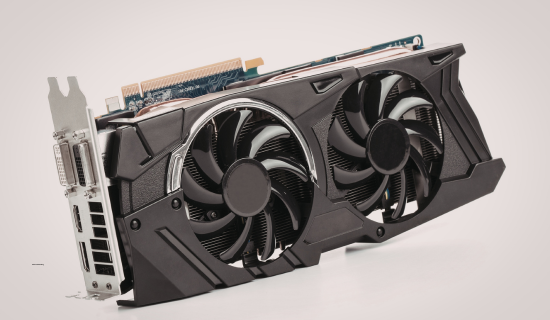
What Is a Graphics Card for Laptop External?
A graphics card for laptop external is a desktop GPU housed inside an external enclosure that connects to your laptop—usually via Thunderbolt 3 or Thunderbolt 4. Affordable to Pro: Best Laptops for Ethical Hacking That Actually Work
Instead of relying on a weak integrated GPU or a limited mobile GPU, your laptop can offload graphical workloads to a full-size NVIDIA or AMD desktop graphics card.
In simple words:
➡ Your laptop borrows desktop-level GPU power when needed. Best Laptop Graphic Card: Complete Guide to Choosing the Right GPU for Your Laptop (2026)
How an External Graphics Card Works
Here’s how an external GPU (eGPU) setup functions:
- The external GPU enclosure holds the desktop graphics card
- Thunderbolt cable connects the enclosure to your laptop
- Laptop routes graphics processing to the external GPU
- Performance boost applies instantly when connected
💡 Many users connect an external monitor for maximum performance, though internal displays can work too. Affordable to Pro: Best Laptops for Ethical Hacking That Actually Work
Laptop Compatibility Requirements (Very Important)
Before buying an external graphics card for laptop use, make sure your system meets these requirements:
1. Thunderbolt Support
- Thunderbolt 3 or Thunderbolt 4 is mandatory
- USB-C alone is NOT enough
- Check your laptop specs carefully
2. Operating System
- Windows 11 / Windows 10 → Best compatibility
- macOS (Intel-based) → Limited but supported
- Apple Silicon (M1/M2/M3) → ❌ eGPU NOT supported
3. CPU & RAM
- At least Intel i5 / Ryzen 5
- Minimum 16GB RAM recommended
Expert Gemstone Identifier: The Smart Way to Identify Any Gemstone
Benefits of Using an External Graphics Card for Laptop
Desktop-level GPU performance
✅ Upgrade graphics without replacing the laptop
✅ Better gaming FPS & stability
✅ Faster video rendering & exports
✅ Ideal for creators, gamers, and developers
Affordable Powerhouses: Best Gaming Laptops Under $1500 Ranked
Limitations You Should Know
Performance loss of 10–20% compared to the desktop
⚠ Expensive setup (enclosure + GPU)
⚠ Requires external power & desk space
⚠ Not portable like internal GPUs
Best Laptop for a Hackintosh: What It Is and Its Value in the AI Era
Best External GPU Enclosures for Laptops (2026)
🔹 Razer Core X
- Thunderbolt 3
- Supports NVIDIA & AMD GPUs
- 650W power supply
- Excellent cooling
Best for: Gamers & creators
🔹 Sonnet eGFX Breakaway Box
- Compact & reliable
- Thunderbolt 3/4 support
- Quiet operation
Best for: Professional workflows
🔹 ASUS XG Station Pro
- Premium build quality
- Strong airflow
- Stable performance
Best for: ASUS laptop users
Top Tools for Video Editing (Free & Paid AI Editors You’ll Love)
Best Graphics Cards for External GPU Setup (graphics card for laptop external)
These GPUs offer the best balance of power and compatibility:
🔹 NVIDIA Options
- RTX 3060 – Best value for money
- RTX 4060 – Power efficient & modern
- RTX 4070 – High-end performance
🔹 AMD Options
- RX 6700 XT – Strong creative performance
- RX 7800 XT – Great for 4K workflows
💡 Avoid ultra-high GPUs like RTX 4090 unless your CPU is powerful enough to prevent bottlenecks. Wonbolt Is Now Accepting Guest Posts in Cybersecurity – Submit Yours
How to Choose a Diamond Ring (2026 Complete Expert Buying Guide + AI Smart Method)
External Graphics Card vs Internal Laptop GPU
| Feature | External GPU | Internal Laptop GPU |
|---|---|---|
| Performance | ⭐⭐⭐⭐☆ | ⭐⭐☆☆☆ |
| Upgradeability | Yes | No |
| Cost | High | Included |
| Portability | Low | High |
The Best Artificial Intelligence Free Resources: AI Courses, Tools & Software
Who Should Buy a Graphics Card for a Laptop’s External Display?
This setup is perfect for:
- 🎮 Gamers with thin laptops
- 🎥 Video editors & YouTubers
- 🎨 3D designers & animators
- 🤖 AI & ML learners
- 🧑💻 Developers needing CUDA or OpenCL
Is an External Graphics Card Worth It in 2026?
Yes, if your laptop supports Thunderbolt and you need serious GPU power without buying a new machine. For professionals and gamers, an external graphics card for laptops deliversdesktop performance while keeping the convenience of a laptop.
However, casual users or students may find a dedicated gaming laptop more cost-effective.
How to Choose a Diamond Ring (2026 Complete Expert Buying Guide + AI Smart Method)
Final Verdict
A graphics card for a laptop external setup is one of the smartest upgrades for power users in 2026. It bridges the gap between portability and performance—giving your laptop a second life with desktop-class graphics. Expert Gemstone Identifier: The Smart Way to Identify Any Gemstone

Additional FAQs: Graphics Card for Laptop External (No Repetition)
Can a graphics card for laptop external setup reduce CPU overheating?
Yes. An external graphics card reduces load on the laptop’s internal GPU, which lowers overall heat generation. Many users notice improved thermal performance because the heavy graphics processing is handled by the external GPU enclosure, which has its own cooling system.
What power supply is required for an external graphics card enclosure?
Most high-quality enclosures sold on Amazon, such as Razer Core X and Sonnet eGFX Breakaway Box, include a built-in power supply ranging from 650W to 750W, which is sufficient for GPUs like RTX 3060, RTX 4060, and RTX 4070.
Does an external graphics card increase laptop battery drain?
Yes. When connected, an external graphics card draws power from its own PSU, but the laptop still consumes more energy for data transfer and display output. However, many eGPU enclosures also charge the laptop via Thunderbolt, reducing the need for a separate charger.
Can an external graphics card improve VR performance on a laptop?
Yes, an external graphics card significantly improves VR performance. GPUs like NVIDIA RTX 4060 and RTX 4070, commonly available on Amazon, meet VR headset requirements and provide smoother frame rates for Oculus and HTC Vive setups.
Is an external graphics card useful for 4K video editing?
Absolutely. A graphics card for laptop external use handles 4K timelines, color grading, and effects smoothly. Amazon-recommended GPUs like RTX 3060 (12GB) and RTX 4070 are especially effective for 4K workflows in Premiere Pro and DaVinci Resolve.
Does an external graphics card support ray tracing?
Yes. NVIDIA RTX-series GPUs support real-time ray tracing when used as an external graphics card. When paired with enclosures like Razer Core X, users can enjoy ray-traced gaming and rendering on Thunderbolt-enabled laptops.
Can students benefit from an external graphics card?
Yes. Students in fields like animation, engineering, architecture, AI, and game development benefit greatly from external graphics cards. Entry-level Amazon options like RTX 3060 provide professional-grade performance without buying a full desktop PC.
How noisy is an external graphics card enclosure?
Noise levels depend on the GPU and enclosure. Premium Amazon enclosures such as Sonnet eGFX Breakaway Box are designed for quiet operation, making them suitable for office and studio environments.
Can I use an external graphics card for dual-monitor setups?
Yes. Most external graphics cards support multiple monitors directly from the GPU ports. Users often connect two or even three displays to GPUs like RTX 4060, improving productivity for editing and multitasking.
Does an external graphics card improve CAD and engineering software?
Yes. Applications like AutoCAD, SolidWorks, and Fusion 360 benefit significantly from an external graphics card. NVIDIA GPUs available on Amazon are widely used due to strong driver optimization for professional workloads.
Is driver installation different for external graphics cards?
Driver installation is similar to desktop GPUs. After connecting the enclosure, you simply install the latest NVIDIA or AMD drivers. Amazon-recommended GPUs typically have excellent driver support and regular updates.
Can an external graphics card be shared between multiple laptops?
Yes, an external GPU enclosure can be used with multiple Thunderbolt-enabled laptops. This makes it a cost-effective Amazon purchase for shared workspaces or home offices.
Does an external graphics card help with livestreaming?
Yes. NVIDIA GPUs like RTX 3060 and RTX 4060 support NVENC encoding, making them ideal for livestreaming on platforms like YouTube and Twitch when used as an external graphics card. The Truth About AI Copywriting Jobs: Myths, Facts & Opportunities
Are external graphics cards future-proof?
External graphics cards are more future-proof than internal laptop GPUs. Enclosures like Razer Core X allow you to upgrade to newer Amazon-available GPUs over time without replacing your laptop.
What is the biggest mistake people make when buying an external graphics card?
The most common mistake is buying an enclosure without confirming Thunderbolt support on the laptop. Another mistake is choosing an overpowered GPU that the laptop CPU cannot fully utilize.
Should professionals choose NVIDIA or AMD for external GPU setups?
Professionals usually prefer NVIDIA GPUs due to better software compatibility, CUDA support, and AI acceleration. This is why NVIDIA cards dominate Amazon sales in the external graphics card category.