


Master On Page SEO with This Powerful 25-Step Work List
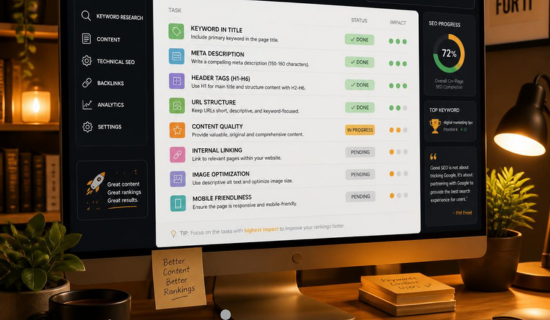
Every successful website shares one thing in common: strong on-page SEO. Whether you’re publishing blog posts, managing an eCommerce store, or optimizing business pages, following a structured on page SEO work list helps search engines understand your content and improves your chances of ranking higher.
On-page SEO isn’t just about placing keywords. It involves optimizing titles, headings, URLs, content quality, images, internal links, page speed, and user experience to satisfy both search engines and your audience. With Google’s Helpful Content system and AI-powered search experiences, creating well-structured, user-focused pages is more important than ever. LinkGraph Alternative: Why Wonbolt Delivers Better SEO Results
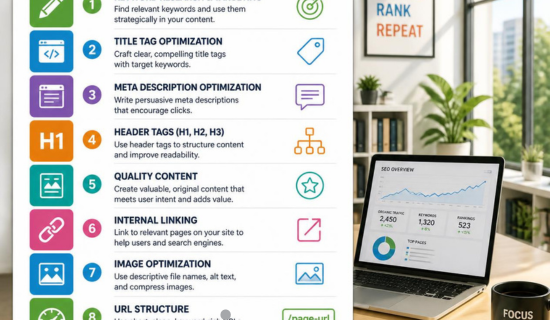
In this guide, you’ll learn a complete on page SEO checklist, practical optimization techniques, and best practices you can apply before publishing any webpage.
What Is On-Page SEO? on page seo work list
On-page SEO is the process of optimizing individual webpages so they rank higher in search engine results and provide a better experience for visitors. It includes improving both visible content and HTML elements, such as title tags, meta descriptions, headings, images, and internal links. Best artificial intelligence voice to text Free Tools for Beginners
Unlike off-page SEO, which focuses on backlinks and external signals, on-page SEO gives you complete control over how your content is presented and understood by search engines.
Quick Answer on page seo work list
An on page SEO work list is a checklist of optimization tasks performed directly on a webpage to improve its visibility, relevance, user experience, and rankings in search engines. How Orphan Pages Affect SEO & How to Eliminate Them
Why Is an On Page SEO Work List Important?
Following a consistent checklist helps ensure every page meets modern SEO standards.
Key benefits include:
- Better Google rankings for target keywords.
- Improved user experience and readability.
- Higher click-through rates from optimized titles and meta descriptions.
- Faster crawling and indexing by search engines.
- Better chances of appearing in featured snippets and AI-generated search results.
- Increased organic traffic and conversions. Laptop vs Chromebook vs Notebook: Everything You Need to Know
Whether you’re a beginner or an SEO professional, a structured workflow reduces errors and keeps every page optimized.
On-Page SEO vs. Off-Page SEO
| On-Page SEO | Off-Page SEO |
|---|---|
| Optimizes content on your website | Builds authority through external signals |
| Focuses on keywords, headings, images, and content | Focuses on backlinks, mentions, and brand reputation |
| Fully under your control | Depends on third-party websites |
| Improves relevance and user experience | Improves website authority and trust |
Both strategies are essential, but on-page SEO is the foundation of every successful SEO campaign. What Is the Best artificial intelligence picture generator free? (Complete 2026 Guide)
How Search Engines Evaluate a Webpage, on page seo work list
Before ranking a page, search engines go through several steps:
1. Crawl the Page
Search engine bots discover and read your webpage.
2. Index the Content
Relevant information is stored in Google’s index.
3. Understand Search Intent
Google analyzes whether your content answers the user’s query effectively.
4. Measure Content Quality
Search engines evaluate originality, expertise, helpfulness, and relevance.
5. Evaluate User Experience
Factors such as mobile responsiveness, page speed, navigation, and Core Web Vitals influence rankings.
6. Rank the Page
Google compares your content with competing pages and determines its position in search results.
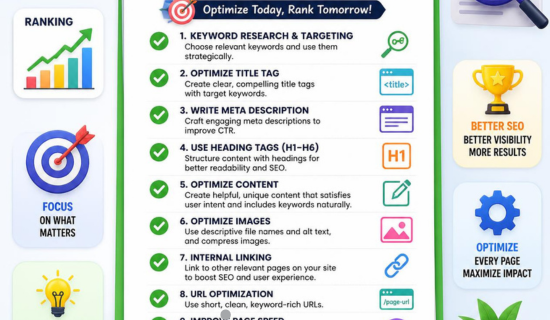
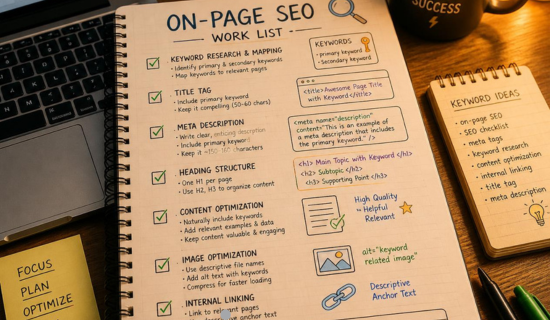
Complete On Page SEO Work List
Use this checklist before publishing any webpage. How to Search for a Keyword the Right Way (Step-by-Step + Shortcuts)
1. Perform Keyword Research
Every page should target one primary keyword supported by related keywords that match user intent.
Best practices:
- Choose keywords with achievable competition.
- Understand informational, commercial, or transactional intent.
- Include semantic keywords naturally.
- Avoid targeting multiple unrelated topics on one page.
2. Create an SEO-Friendly URL, on page seo work list
A clean URL helps both users and search engines understand the page.
Example:
Good
yourwebsite.com/on-page-seo-work-list
Avoid
yourwebsite.com/post?id=4528
Keep URLs:
- Short
- Descriptive
- Keyword-focused
- Hyphen-separated
On-Page SEO Checklist for New Websites: Audit & Optimization Guide
3. Optimize the Title Tag
Your title tag is often the first thing users see in search results.
A strong SEO title should:
- Include the primary keyword.
- Stay within 50–60 characters.
- Use compelling words that encourage clicks.
- Clearly describe the page content.
Example:
Ultimate On Page SEO Work List: 25 Essential Tasks for Higher Rankings
The Hidden Power of Voice Artificial Intelligence Most People Ignore
4. Write a Compelling Meta Description
Although it isn’t a direct ranking factor, a good meta description improves click-through rates.
Include:
- Primary keyword
- Clear value proposition
- Natural call to action
- Around 150–160 characters
Example:
Learn the complete on page SEO work list with proven optimization techniques, expert tips, and a practical checklist to improve your Google rankings.
Latest Artificial Intelligence News & Developments You Need to Know
5. Use One H1 Heading
Each page should have a single H1 tag that clearly describes the topic.
Your H1 should:
- Include the target keyword.
- Match the user’s search intent.
- Be unique and descriptive.
Avoid using multiple H1 tags on the same page.
6. Organize Content with Proper Headings
Use a logical heading structure to improve readability.
Example:
- H1: Main topic
- H2: Major sections
- H3: Subtopics
- H4: Supporting details
Well-structured headings also help AI systems understand your content more effectively.
Best laptop for Hacking, Exploring with AI, and powerful Recommendations
7. Write High-Quality, Helpful Content
Google rewards content that genuinely solves users’ problems.
Focus on:
- Original insights
- Accurate information
- Practical examples
- Updated facts
- Clear explanations
Write for people first, then optimize for search engines.The Ultimate 2026 Guide to Best AI Tools for Science Research and Data Innovation
8. Improve Content Readability
Easy-to-read content keeps visitors engaged.
Follow these practices:
- Short paragraphs
- Simple language
- Bullet points
- Numbered lists
- Descriptive headings
- Transition words
A better reading experience often leads to longer session durations and lower bounce rates.
9. Use Keywords Naturally
After choosing your primary keyword, place it where it helps search engines understand the topic without overusing it.
Include your keyword in:
- Title tag
- URL
- H1 heading
- First 100 words
- Some H2/H3 headings
- Meta description
- Image alt text (where relevant)
- Conclusion
Also use related terms and synonyms to improve topical relevance. Avoid keyword stuffing, as it can hurt both readability and rankings.
AI for Risk Management Made Easy: Reduce Risk Fast
10. Optimize Images
Images enhance user experience, but they should also be SEO-friendly.
Image optimization checklist:
- Use descriptive file names.
- Add meaningful alt text.
- Compress large images.
- Use modern formats like WebP when possible.
- Enable lazy loading.
Optimized images improve accessibility and page speed while increasing your chances of appearing in Google Images.
Massive AI Updates: What’s New in Artificial Intelligence Right Now
11. Add Internal Links
Internal links connect related pages on your website and help search engines discover your content.
Best practices:
- Link to relevant articles.
- Use descriptive anchor text.
- Link to important service and category pages.
- Avoid excessive links on one page.
A strong internal linking strategy improves user navigation and distributes page authority across your website.
Dominate Search Results with Expert on Page SEO Optimization Strategies
12. Link to Trusted External Sources
Adding links to authoritative websites strengthens your content’s credibility.
Link to reliable sources when referencing:
- Research studies
- Government resources
- Industry statistics
- Official documentation
Only link where it adds value for readers. SEO Automation Secrets: The Smartest Way to Scale Traffic Fast
13. Add a Frequently Asked Questions (FAQ) Section
FAQs help answer related search queries and improve your chances of appearing in featured snippets and AI-generated answers.
Include concise answers that address common user questions about your topic.
14. Implement Schema Markup
Structured data helps search engines better understand your content.
Useful schema types include:
- Article Schema
- FAQ Schema
- Breadcrumb Schema
- Organization Schema
- How-To Schema (when applicable)
Schema can enhance your search appearance with rich results.
15. Improve Page Speed
Fast-loading pages provide a better user experience and support higher rankings.
Focus on:
- Compressing images
- Reducing unnecessary scripts
- Enabling browser caching
- Using a Content Delivery Network (CDN)
- Optimizing CSS and JavaScript
Regularly monitor your Core Web Vitals to identify performance issues.
16. Optimize for Mobile Devices
Since Google primarily uses mobile-first indexing, every page should work seamlessly on smartphones and tablets.
Check that your website has:
- Responsive design
- Readable text
- Clickable buttons
- Proper spacing
- Fast mobile loading
A mobile-friendly website improves both rankings and user satisfaction.
17. Enhance User Experience (UX)
Google values websites that are easy to use.
Improve UX by:
- Keeping navigation simple
- Using clear calls to action
- Maintaining consistent formatting
- Avoiding intrusive pop-ups
- Making important information easy to find
A positive user experience encourages visitors to stay longer and explore more pages.
18. Optimize for Featured Snippets
Featured snippets often appear above traditional search results.
Increase your chances by including:
- Clear definitions
- Step-by-step instructions
- Numbered lists
- Bullet points
- Comparison tables
- Short answers (40–60 words)
Formatting content for quick answers also benefits AI-powered search engines.
19. Optimize for AI Search (AEO)
Answer Engine Optimization (AEO) helps your content perform well in AI-generated search experiences.
Follow these best practices:
- Answer questions directly.
- Use descriptive headings.
- Cover topics comprehensively.
- Include FAQs.
- Use clear, conversational language.
- Support claims with accurate information.
- Demonstrate experience and expertise.
Well-structured content is easier for AI systems to interpret and summarize.
20. Add a Table of Contents
For long articles, a table of contents improves navigation and helps users quickly locate the information they need.
It also enhances the overall reading experience and can generate jump links in search results.
21. Optimize for Voice Search
Voice searches are typically longer and more conversational.
To optimize:
- Answer questions naturally.
- Target long-tail keywords.
- Use simple language.
- Include FAQ sections.
- Write concise, direct answers.
This increases visibility for voice assistants and AI search tools.
22. Improve Click-Through Rate (CTR)
Higher rankings don’t guarantee more traffic if users don’t click your result.
Increase CTR by:
- Writing compelling SEO titles.
- Using action-oriented language.
- Including numbers where appropriate.
- Matching search intent.
- Creating informative meta descriptions.
A better CTR signals relevance and can contribute to improved performance over time.
23. Strengthen E-E-A-T Signals
Google values content that demonstrates:
- Experience
- Expertise
- Authoritativeness
- Trustworthiness
Build stronger E-E-A-T by:
- Including an author bio.
- Citing trustworthy sources.
- Keeping content accurate and updated.
- Displaying contact information and business details.
- Publishing original, experience-based insights.
24. Update Existing Content
SEO is an ongoing process.
Regularly review your pages to:
- Refresh outdated information.
- Add new examples.
- Improve readability.
- Fix broken links.
- Update statistics.
- Expand sections that no longer satisfy search intent.
Fresh content signals relevance and helps maintain rankings.
25. Perform a Final SEO Audit
Before publishing, complete a final review to ensure nothing has been overlooked.
Quick Pre-Publish Checklist
| SEO Task | Status |
|---|---|
| Primary keyword optimized | ✓ |
| SEO-friendly URL | ✓ |
| Title tag optimized | ✓ |
| Meta description written | ✓ |
| One H1 tag used | ✓ |
| Proper heading structure | ✓ |
| Helpful, original content | ✓ |
| Images optimized | ✓ |
| Internal links added | ✓ |
| External authority links included | ✓ |
| FAQ section added | ✓ |
| Schema markup implemented | ✓ |
| Mobile-friendly design | ✓ |
| Fast loading speed | ✓ |
| Core Web Vitals checked | ✓ |
| E-E-A-T signals included | ✓ |
| Proofreading completed | ✓ |
Following this on page SEO work list ensures every page is optimized for search engines, AI-powered search, and, most importantly, your audience.
Best Practices, FAQs, Conclusion & CTA
Common On-Page SEO Mistakes to Avoid
Even experienced website owners can make mistakes that limit their search visibility. Avoid these common issues to maximize the impact of your on page SEO work list.
- Keyword stuffing instead of writing naturally.
- Missing or duplicate title tags that confuse search engines.
- Using multiple H1 tags on a single page.
- Publishing thin or outdated content that doesn’t satisfy user intent.
- Ignoring image optimization, including missing alt text and oversized files.
- Poor internal linking, making it harder for users and search engines to discover related pages.
- Slow page speed caused by unoptimized images, scripts, or hosting.
- Not optimizing for mobile devices, despite Google’s mobile-first indexing.
- Missing schema markup, reducing opportunities for rich results.
- Skipping content updates, allowing competitors to outrank your pages.
Avoiding these mistakes helps improve rankings, user experience, and long-term SEO performance.
Best On-Page SEO Tools
The right tools make optimization faster and more accurate. Here are some of the most trusted options:
| Tool | Best For |
|---|---|
| Google Search Console | Monitor indexing, search performance, and technical issues |
| Google Analytics 4 | Analyze user behavior and conversions |
| Google Keyword Planner | Keyword research and search volume |
| Rank Math SEO | WordPress on-page optimization |
| Yoast SEO | Content analysis and metadata management |
| Ahrefs | Keyword research and backlink analysis |
| Semrush | Comprehensive SEO audits and competitor research |
| Screaming Frog SEO Spider | Technical website crawling and audits |
| Google PageSpeed Insights | Core Web Vitals and page speed analysis |
| GTmetrix | Website performance testing |
Using a combination of these tools helps you maintain a healthy, search-friendly website.
On-Page SEO Best Practices for 2026
SEO continues to evolve, but these best practices remain essential:
- Create original, people-first content that satisfies search intent.
- Organize content with clear headings and logical structure.
- Optimize every page for one primary keyword and related semantic terms.
- Improve Core Web Vitals and overall page speed.
- Build a strong internal linking structure.
- Add FAQ sections and structured data where appropriate.
- Keep content updated to maintain relevance.
- Focus on E-E-A-T by demonstrating real expertise and trustworthiness.
- Optimize for AI Overviews and Answer Engine Optimization (AEO) by providing concise, direct answers.
- Continuously monitor performance and refine your pages based on analytics and search data.
Frequently Asked Questions
What is an on page SEO work list?
An on page SEO work list is a structured checklist of tasks used to optimize a webpage, including keyword placement, content quality, headings, metadata, images, internal links, and technical improvements.
How do I perform on-page SEO?
Start with keyword research, create high-quality content, optimize your title, URL, headings, images, and internal links, improve page speed, and review the page before publishing.
What are the most important on-page SEO factors?
The most important factors include search intent, quality content, title tags, headings, keyword optimization, internal linking, page speed, mobile responsiveness, and user experience.
Is on-page SEO enough to rank on Google?
No. On-page SEO builds the foundation, but strong rankings also depend on off-page SEO, backlinks, website authority, technical SEO, and high-quality content.
How often should I update on-page SEO?
Review important pages every 3–6 months or whenever search trends, algorithms, or your industry change.
Which SEO plugin is best for WordPress?
Rank Math and Yoast SEO are among the most popular plugins for optimizing WordPress websites.
Does image optimization improve SEO?
Yes. Optimized images improve page speed, accessibility, and user experience while increasing visibility in image search.
What is keyword stuffing?
Keyword stuffing is the excessive use of keywords in content. It creates a poor reading experience and can negatively affect search rankings.
Why is internal linking important?
Internal links help search engines crawl your website, distribute authority between pages, and guide users to relevant content.
How does AEO differ from traditional SEO?
SEO focuses on improving search rankings, while Answer Engine Optimization (AEO) structures content to provide direct, trustworthy answers that AI-powered search engines can easily understand and present.
Conclusion
A well-planned on page SEO work list is the foundation of every successful SEO strategy. From keyword research and content optimization to internal linking, page speed, and structured data, each task plays a vital role in helping search engines understand your website and deliver a better experience for users.
Remember that SEO isn’t a one-time task. Regular audits, content updates, and continuous improvements will keep your pages competitive as search algorithms evolve. By following this checklist consistently, you’ll improve your chances of earning higher rankings, attracting qualified organic traffic, and increasing conversions from both traditional search engines and AI-powered search experiences.
Boost Your Rankings with Professional SEO Services from Wonbolt
Implementing an effective on-page SEO strategy takes time, expertise, and ongoing optimization. If you want to improve your website’s visibility, grow organic traffic, and achieve sustainable search rankings, the SEO specialists at Wonbolt are here to help.
Our services include:
- Comprehensive On-Page SEO Audits
- Technical SEO Optimization
- Content Strategy & SEO Copywriting
- Keyword Research & Topic Clustering
- Internal Linking Optimization
- Local SEO & Enterprise SEO
- High-Quality Guest Posting & Blogger Outreach
- AI Search (AEO) Optimization
Whether you’re launching a new website or improving an existing one, we’ll create a customized SEO strategy tailored to your business goals.
📧 Contact us today: infowonbolt@gmail.com
Let Wonbolt help you turn your website into a powerful source of consistent organic traffic and long-term business growth.